The bottleneck isn't the agents. It's me
When I run several AI agents at once, the agents don't slow me down. What slows me down is not knowing who is waiting for me.
I run several AI agents at once. Claude Code, Codex, each on a different project, each on a different task. One builds a feature, the second fixes a test, the third writes documentation.
For a long time I thought the limit was the agents' performance. It isn't. The limit is me. My attention. An agent that waits twenty minutes for my "yes" isn't working. And I don't know about it, because I'm looking at another window.
Where the time goes
I had five to ten terminals in VS Code. Each looked the same. A black window, text, a cursor. To find out what was going on in one, I had to open it and read.
The same three situations, over and over. The agent asked and is waiting for an answer. The agent crashed on an error and nobody tried again. The agent finished the work and nobody picked it up. In all three cases the work stands still and I feel like everything is running.
A stuck build or an unanswered question hides among the other windows. That was the whole problem: I couldn't see who was stuck.
Fleet: one window for the whole fleet
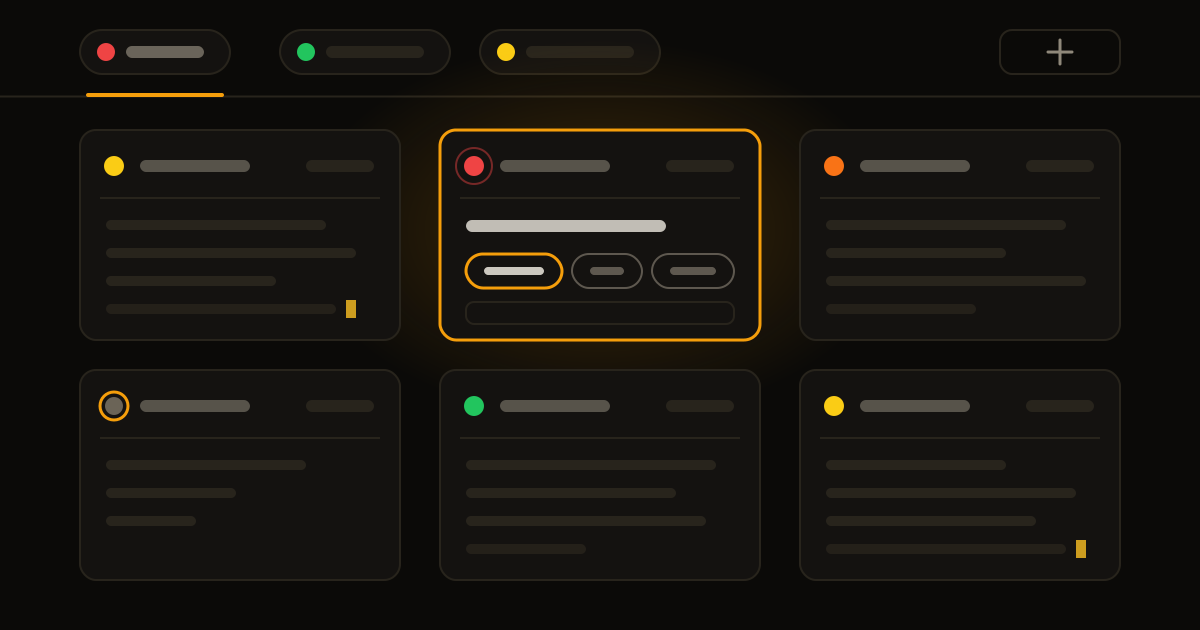
So I built my own tool. I call it Fleet. It's a desktop app just for me. One window, project tabs at the top.
Each project has its own PO, a product owner. That's an agent that holds the big picture of the project. It's pinned first and never leaves. Next to it run the working terminals. I add a new one with one click, Claude or Codex, depending on the task. When the work is over, I close the terminal.
The agents keep running even when I close Fleet. The window is just a view. The work lives underneath it.
Every agent has to say what state it's in
This is the core of the whole thing. Every terminal has a status, in words and in color. Not "something is happening", but exactly:
- Asking: waiting for my decision. Red.
- Error: something crashed. Also red.
- Done, something missing: the agent finished, but wrote itself that it didn't verify something or needs me. Orange.
- Quiet: it looks like it's working, but nothing has happened for ten minutes. Probably stuck. Grey with an amber ring.
- Test it: finished with no caveats. Now I have to try it. Green.
- Working: leave it alone. Yellow.
The worst status across all terminals rolls up to the project tab. A glance at the top is enough. A red tab means someone there is waiting for me or something crashed. Yellow means there's nothing for me to do there right now.
And one thing matters. When the status can't be determined, Fleet doesn't make up that it's done. A missing signal isn't success. It would rather show "I don't know" than a fake green.
The bottleneck isn't the agents. It's my attention. The system should watch who is waiting for me, so I don't have to.
I step in only where it's needed
Above the terminals there's an overview. One row per terminal: name, status, task. The task is either my own description or the topic the conversation gave itself. I don't have to remember what I sent where.
My work changed. I don't cycle through windows. I look at the red ones and answer or fix. I look at the orange ones and decide. I test the green ones. The rest I leave running.
It's the same as leading a team of people. A good manager doesn't walk around the office looking over everyone's shoulder. They want to know who is stuck and who needs a decision. They let the rest work. With agents this holds even more. You can have more of them than people, and none of them will come to you on their own.
When I click on a finished result, it dims. I know what I've already seen and what I haven't. A dimmed result no longer colors the tab, so only what really wants me glows at the top.
Small things that save the most
A few things look like details. Yet they make the biggest difference.
One place to type. Under each terminal there's a normal text field. I type there like in any editor, with accents, with copy and paste, with corrections. When an agent is waiting for option 1, 2 or 3, a number typed into the terminal by mistake won't answer for me.
Options as buttons. When the AI offers options, they appear above the field as buttons. I click and that's it. If the offer changed in the meantime, Fleet sends nothing and tells me to choose again.
A made-up example: an agent is building a website login and hits a decision. Instead of a number typed into the terminal, I see this:
Dictation. A microphone button or a double tap on the right Command key. I speak, and the text lands where I'm typing. It never sends it on its own. I have the last word.
Coming back after a restart. After the computer restarts, the terminals come back and pick up exactly the conversation that was running in them. When it can't be found, Fleet doesn't quietly start a new one. It opens an empty terminal and writes why.
Moving between projects. I grab a terminal by its header and drag it onto another project's tab. The agent keeps running, with its conversation, it just lives somewhere else.
How to try it with two agents
You don't have to build your own app. The principle holds even when you have two agents and one chat.
- Every agent reports its status. Working, waiting for you, finished, something missing. Put it in its instructions: always end with one sentence on what is done and what isn't.
- Separate "waiting for me" from "working". That's the only distinction you really need. Everything else is a bonus.
- Silence isn't success. When an agent hasn't said anything for a long time, don't assume it's running. Go look.
- Done means tested. Until then it's work to review.
- One view of everything. Not ten windows you switch between. One overview where you see right away who is waiting for you.
A test for tomorrow morning: before you start another agent, say which of the running ones is waiting for you right now. If you can't tell within ten seconds, you don't have a capacity problem. You have an overview problem.
More agents won't help you when you don't know which of them is stuck. Build the overview first. Then add agents.